How to keep one AI character consistent across Instagram posts (for app pages)
Decide who the character is once, keep a few reference shots, change one thing per post, and check every new picture against the reference before it goes out. Keep the cast small and label every character as AI. Image models still drift on small details, so the check matters more than the prompt.
Why consistency matters for an app page
On an app's page the character is a recurring face, not the product. Followers start to recognise them, and a face that changes from post to post looks careless or, worse, like stock photos stitched together. One consistent character, clearly labeled as AI, reads as a deliberate brand choice.
This is different from building an "AI influencer". The character isn't pretending to be a person with a life and opinions; they act out the moment your app helps with, and the caption says they're AI.
1. Write a character sheet first
Before making any picture, write down the parts that must never change and the parts that can:
- Fixed: age range, face shape, hair colour and length, skin tone, eye colour, one distinctive detail (glasses, freckles, a fringe).
- Fixed: who they are in one line, tied to your users: "a second-year student who studies on the bus", not "a beautiful young woman".
- Can change: outfit, room, light, expression, what's in their hands.
Reuse the fixed lines word for word in every prompt. Most drift starts with a description that was retyped slightly differently.
2. Keep a small set of reference shots
Pick three to five pictures of the character you're happy with: one straight-on, one three-quarter, one in the light you post in most. Every new picture is made from these, and every new picture is judged against them. If your tool supports reference images, use them; if it only takes text, the character sheet carries the load.
3. Change one thing per post
A new outfit, a new room and a new camera angle at once is where faces drift. Change the scene, keep the outfit; or change the outfit, keep the room. Over a week that still gives plenty of variety.
4. Check side by side before posting
Put the new picture next to a reference shot and look at the things viewers notice: hairline, eyebrows, nose, jaw, eye colour, and hands. If it reads as a cousin rather than the same person, make it again. This step catches more than any prompt trick.
5. Keep the cast small
Two or three characters is plenty for one app: say, a student, a parent and a night-shift worker, each matched to a group in your reviews. A small cast is easier to keep consistent, and repeat faces build recognition.
6. Label every character as AI
- A caption line near the top saying the character is AI.
- Instagram's AI label on the post, and its AI-generated profile setting if the character is the face of the page. Since 31 August 2026, undisclosed AI-person profiles get less reach.
- Never let the character claim to be a customer or say "I used this app". That's a fake testimonial, whatever the label says. See is AI UGC legal?
How Slide-Easy handles a fixed cast
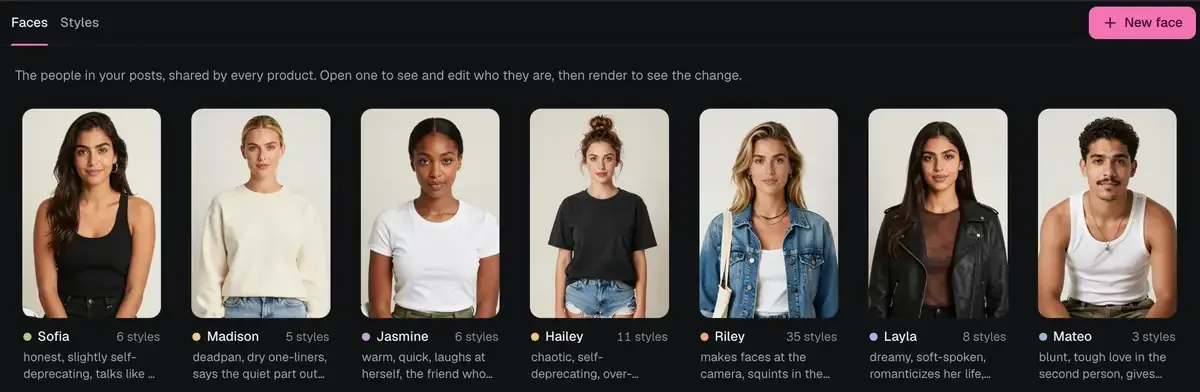
- A model card for each face: reference shots and a description of who they are, so the same character stays recognisable across posts.
- Picture variations: new shots of the same face, kept to its model card.
- A small cast: the same few characters come back across your posts, each with a name and a personality line.
- Labels by default: a caption line, Instagram's AI flag when it posts through the API, and IPTC/XMP metadata in every file.
- Your face only: you can add your own face on a Mac with 24 GB of memory. Never anyone else's.
Image models can still drift on small details, which is one reason every post waits for your OK. It runs on your Mac (an Apple silicon Mac (M1 or newer), macOS 15 or later, 16 GB of memory, and a one-time model download), first 7 posts free, then $49 once.
More: AI UGC for mobile apps · 30 post ideas from App Store reviews · Reel ideas by category · All guides
Drafted with AI help and fact-checked against the data. Instagram's profile label is from TechCrunch, 31 August 2026.
AI character FAQ
How do I keep an AI character's face the same across posts?
Write down who they are once, keep a small set of reference shots, change only one thing per post (the scene or the outfit, not both), and compare each new picture with the reference before posting. Re-make any picture where the face has drifted.
How many AI characters should an app page have?
A few. A small cast that comes back again and again is easier to keep consistent and easier for followers to recognise than a new face every post.
Do I have to label an AI character on Instagram?
Yes. Say it's an AI character in the caption, turn on Instagram's AI label, and if the character is the face of the page, use Instagram's AI-generated profile setting. Since 31 August 2026, undisclosed AI-person profiles get less reach.
Can I make an AI character of a real person?
Only yourself. Don't make AI versions of anyone else's face, voice or name without their written permission. Slide-Easy allows your own face on a Mac with 24 GB of memory, never anyone else's.