For indie app makers · Mac app
A week of Instagram posts for your app. From one App Store link.
Slide-Easy reads your app's real reviews and turns them into Reels and carousels your users will recognise. You approve the week in one click. $49 once. No credits, no subscription.
Free download · no card, no account · then $49 once for unlimited, vs $228+ a year for credit-based tools · 14-day refund
Runs on your Mac: Apple Silicon (M1 or newer), 16 GB memory, macOS 15+. Not sure? Apple menu › About This Mac.
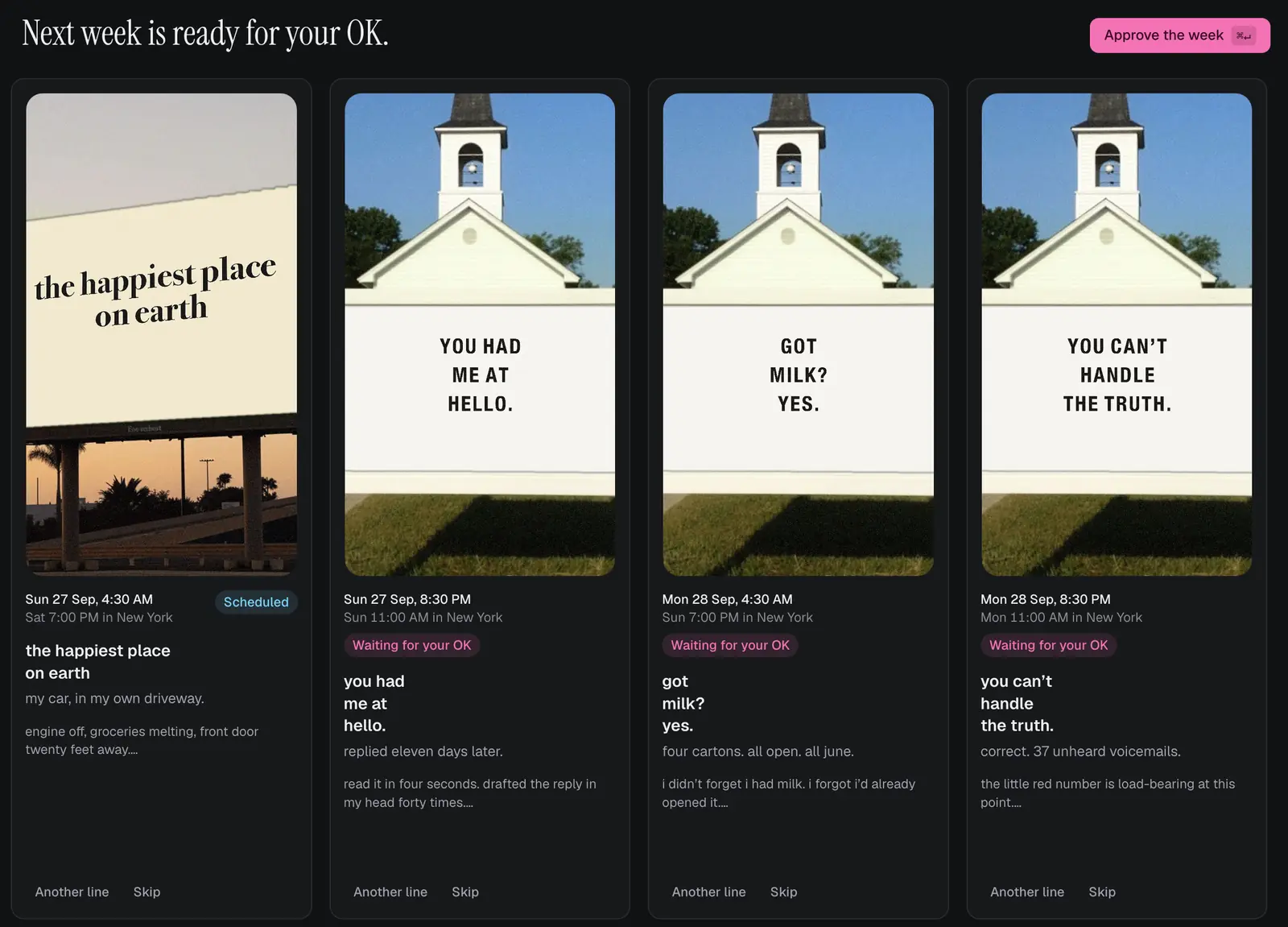

This week, in the app. Every post waits for your OK.
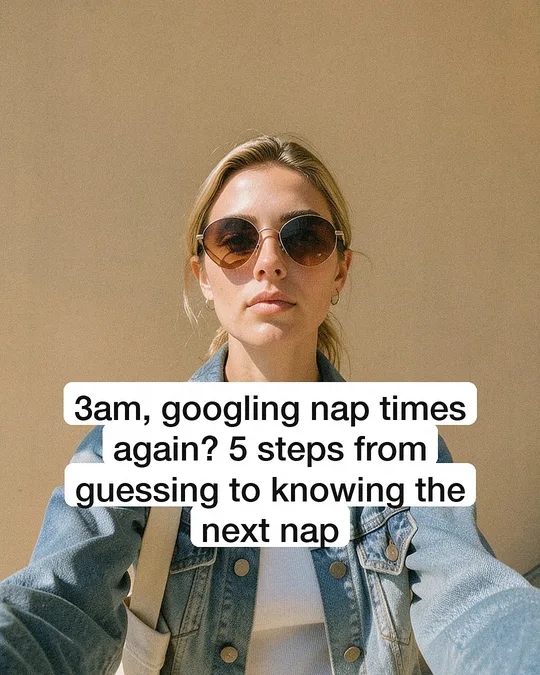
Posts it made. No designer, no editing.
Each one starts from something real users say about the app, then lands on the app itself.
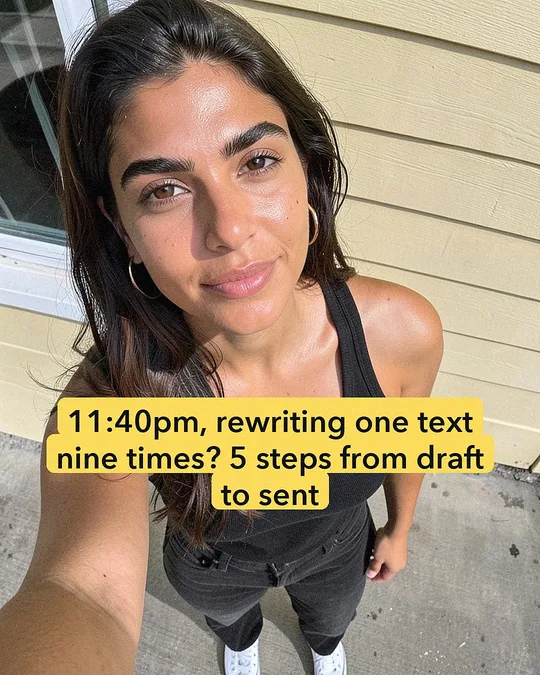



All made by the app. The people are AI characters, and every post is labeled as AI when it goes out.
Paste a link. Approve the week. It posts.
Paste your App Store link. It reads your reviews and learns how your users talk about the problem your app solves.
Approve the week. Finished Reels and carousels, each checked before you see it. Skip any, or ask for another line.
It posts on schedule. Or save a post and share it yourself. Then it makes more of what got the most reach.
▶ Watch it make a week of posts Step by step, on YouTube
30 posts take about 1½ hours on an M4 Pro and roughly 3 on a base M1–M4. Start it, go do something else: it keeps the Mac awake and picks up where it left off.
Built to keep your account in good standing.
- Nothing posts without your OK. Approve, skip or undo any post until it's live. Autopilot, which posts on schedule without asking, stays off unless you turn it on.
- Labeled as AI, the way Instagram asks. Every post goes out with Instagram's AI label and an "AI character" line in the caption, so you're not passing off fake people as customers.
- A warm-up plan for new accounts. Seven days of simple daily steps for a fresh account, so it grows like a person, not a bot.
- A weekly reach check. If your posts suddenly reach far fewer people, it tells you the likely cause and what to fix.
No tool can promise Instagram will never limit an account. These give your posts a fair start.
Everything the job needs. Paid for once.
Writing, pictures, voiced videos, checking, scheduling, posting and seeing what worked, all in one app. Other tools charge monthly and count credits. Slide-Easy runs on your Mac, so there are no server bills for us to pass on, and nothing to meter.
| Tool | Price | First year |
|---|---|---|
| Slide-Easy | $49 once | $49 |
| Fastlane | $29–$149 / mo | $348–$1,788 |
| ReelFarm | $19–$197 / mo | $228–$2,364 |
$49once
- Unlimited posts, for as many apps as you like
- Key works on 2 Macs, with 2 years of updates
- Try 7 posts free first
- Full refund within 14 days
The key arrives by email right away. VAT included in the EU/UK and most countries; US, Canada and India sales tax is added at checkout. By buying you agree to the Terms and Refund Policy. Polar is the merchant of record; seller details in the Imprint.
Questions
Will it run on my Mac?
It needs an Apple Silicon Mac (M1 or newer) with 16 GB of memory, macOS 15 or later and about 14 GB of free disk. 16 GB is enough for everything except one extra: using your own photos and characters needs 24 GB. Macs with 8 GB of memory, Intel Macs and Windows PCs can't run it. To check: Apple menu › About This Mac shows your chip and memory.
Are the posts any good?
Every post is scored before you see it, and weak ones are rewritten. In our test (26 Sep 2026) the built-in model on your Mac scored the same hooks within half a point of Claude Opus (9.4 vs 9.75, 8.4 vs 8.8), and both rejected the weak one ("adhd tips that actually work": 2.6 and 2.4). Its own writing is plainer than Claude's: good for a steady week, less sharp on wordplay. If you already pay for Claude or ChatGPT, switch the writer to it in Settings.
How does it post? Will it post without asking me?
Two ways. Save a post (the slides or video and its caption land in Downloads), post it from the Instagram app and tap Mark posted. Or connect a professional (Business or Creator) Instagram account through your own Meta developer app, a one-time setup of about 20 minutes, and it posts on your schedule while Slide-Easy is open; if your Mac was asleep, it catches up. Nothing goes out without your OK unless you turn on Autopilot.
Is there a subscription or credits?
No. Your first 7 posts are free with no key. After that it's $49 once for unlimited posts on up to 2 Macs. The key re-checks online weekly and the app works offline for up to 30 days. Full refund within 14 days.
Does anything leave my Mac?
Your posts and products stay on your Mac. What goes out: the posts you approve (to Instagram, through a Cloudflare tunnel your Mac opens so Instagram can fetch the pictures), the licence check, public pages about your app that it reads, and the one-time model downloads. If you choose Claude or ChatGPT as the writer, prompts go to them under your own account. Details
Will Instagram punish AI posts?
Instagram asks for AI-made posts to be labeled, and Slide-Easy labels every one: Instagram's own AI label plus an "AI character" line in the caption. Labeled posts are allowed. What hurts reach is the usual: spammy posting, copied posts across accounts, or a brand-new account posting too much too soon. The warm-up plan and the weekly reach check cover those.
Will it slow down my Mac?
While it's making posts, yes: it uses the whole chip, like exporting a video. Start a batch when you're done for the day, or watch the live heat and memory view in the app. When it isn't making posts, it sits idle.
Who owns the posts?
You do, as far as AI-made content can be owned where you live. You can use them commercially, for your own apps and your clients'. They stay on your Mac unless you post them.
What happens after the 7 free posts?
The app keeps working and keeps everything you made; it just won't make new posts until you add a key. Buy one for $49, paste it in Settings › Licence, and carry on. Updates for at least 2 years are included.
Does it do TikTok?
Not yet. Today it makes Instagram Reels and carousels. TikTok is next.
macOS says it can't open Slide-Easy?
It's a new app, not yet notarized by Apple, so macOS asks first. Move Slide-Easy to Applications and open it once, then close the warning. Open System Settings › Privacy & Security, scroll down, click Open Anyway next to Slide-Easy and enter your Mac password. It opens normally from then on.
What runs on my Mac, exactly?
Open models, downloaded once during setup: Z-Image Turbo and FLUX.2 Klein for pictures, Qwen3-VL-8B for writing and checking, Qwen3-TTS for voiced videos. All through Apple's MLX. Full list on the licences page.
Make your first 7 posts free, tonight.
Made by the people behind Amble. Questions? Write to us, we answer within 48 hours.